

Who Knew Process Diagrams Could Be Fun?
Break free from flat screens. Our alpha version on the Meta Quest lets you build workflows in real 3D space and model complex business processes with your hands and voice - AI assisted by our Mission Control.
Work the Way Humans Naturally Think and Create
Galactify Spatial Diagrams combines the power of gesture, speech, and spatial awareness to make process design intuitive and human. Use your hands, your voice, and your space to understand, shape, and improve complex workflows — all inside a 3D workspace built for the way you think.
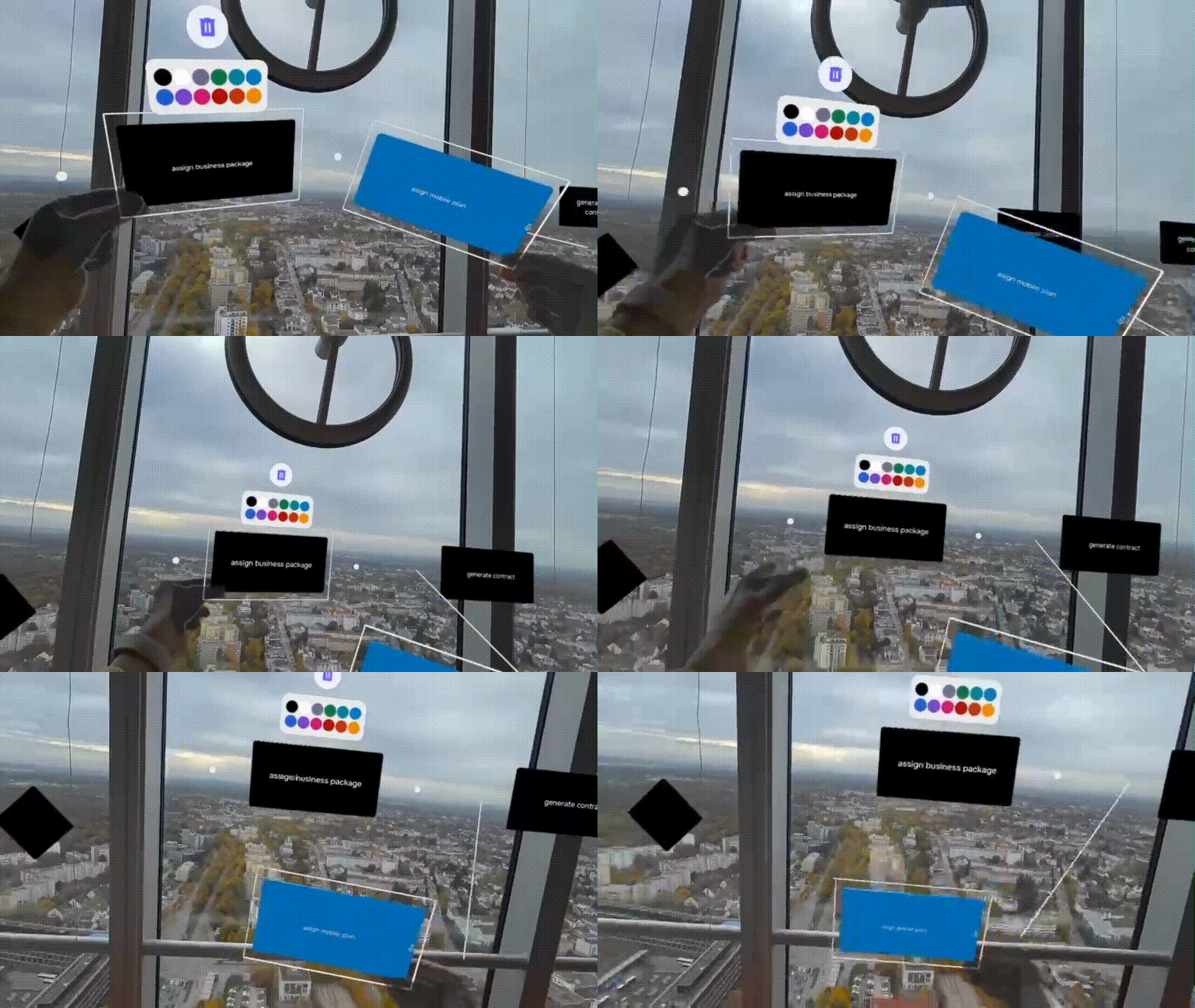
Work Naturally — With Your Hands
Grab, move, and rearrange process steps directly in 3D space. Galactify Spatial Diagrams transforms abstract tasks into tangible structures — making process design faster, more intuitive, and deeply human.
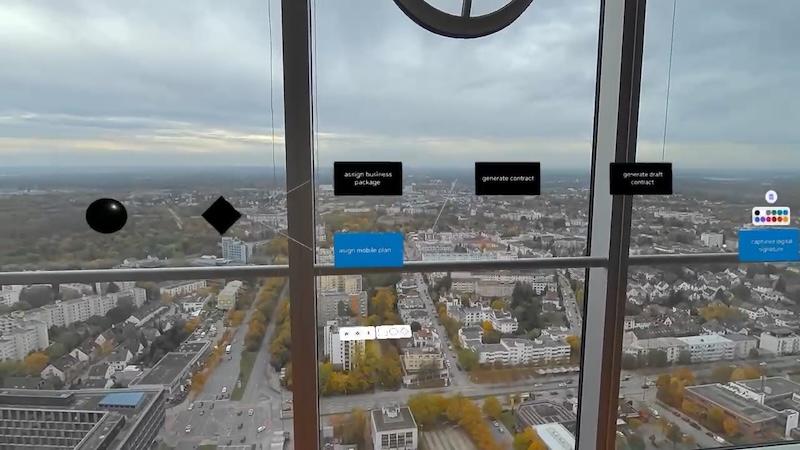
See the Big Picture — Literally
Step back to gain a bird’s-eye view of your process landscape, or move closer to dive into the details. Galactify Spatial Diagrams lets you shift perspective just like you do in the real world — helping teams instantly grasp context and complexity.
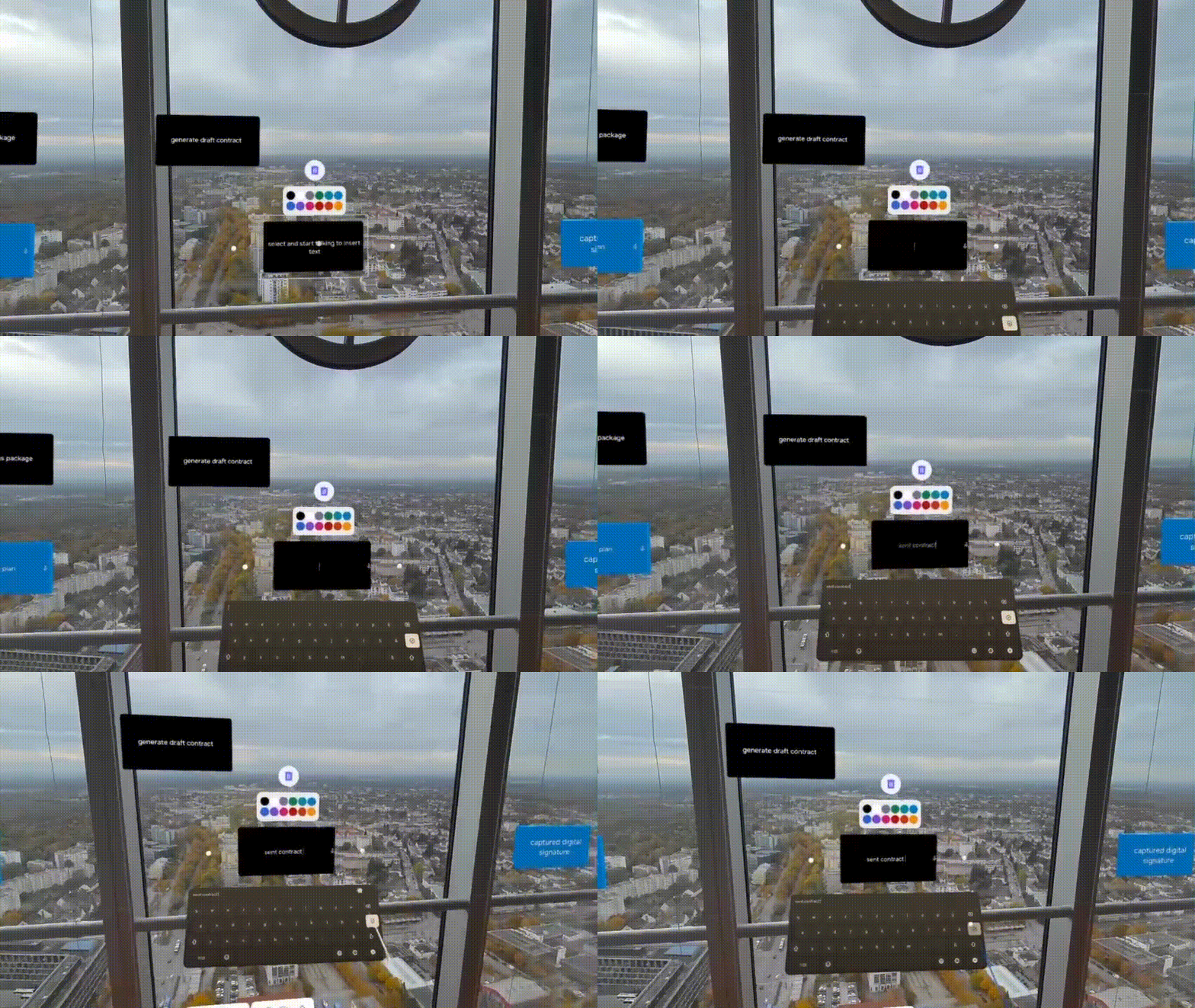
Speak Ideas Into Existence
Use your voice to name steps or create new ones — no menus or shortcuts required. Galactify’s built-in local speech recognition makes process modeling as natural as thinking out loud.
What Changes with XR Diagramming
Empowering Features to Create Intuitive Spatial Diagrams and Visualize Complex Processes

On device speech to text
Create process steps instantly with local transcription. No internet needed, keeping your data private and secure.
Intuitive Hand Gestures
Grab and move process items as naturally as picking up cards on a board. Designed for fluid, physical interaction that feels instantly familiar.
AR and VR for flexible immersion
Work your way, stay grounded in passthrough mode or dive deep into full VR for total focus.
Smart Alignment
Spatial workspaces can become chaotic quickly -> not with Galactify. Our smart grid and grouping features keep your diagrams tidy and aligned effortlessly.
AI + XR = Workflow Superpower
Explain your process in natural language, and Galactify’s AI instantly transforms it into structured process steps. Get a head start on designing great business workflows in XR. (coming soon for XR)
Hand Tracking & Hand Pointer
Work the way that feels right — use precise hand-pointer gestures from a distance, or reach out and grab items directly in 3D space.
What Productivity Enthusiasts and Early Testers Say
Connecting process elements with my hands felt absolutely magical. I’ve used my Meta Quest for a while, and it’s great to see how much smoother everything runs on the Quest 3. I’m really looking forward to when the nesting features from Galactify's browser version come to the headset, as that will take it to the next level, literally!
Patrick
CTO
Tech Stuff
As someone that's constantly torn between paper and digital note taking I loved using Galactify Spatial Diagrams on the Meta Quest because it gave me the physical sensation of paper and the benefits of digital persistence.

Serena
Data Scientist
Tecniplast Group
The moment I was able to grab and move process steps like cards was impressive, especially when I could rearrange them in 3D. It felt intuitive and efficient, and I'm excited to see if this is the way we'll be working in the future.

Cornelius
Venture Development
Wayra
Questions About Galactify Spatial Diagrams
How does voice input work offline?

Galactify XR Diagrams processes voice input directly on the device — no internet connection or cloud processing required. Speech recognition runs locally on the Meta Quest headset, ensuring fast performance and complete data privacy. Your voice commands never leave your device.
Does it work in both AR and VR?
Yes. Galactify Spatial Diagrams supports both Augmented Reality (AR) and Virtual Reality (VR) modes, letting you choose how immersive you want your workspace to be.
In AR mode, you can use passthrough to see your surroundings while placing process elements right in your real environment — ideal for collaborative sessions or mixed-reality workspaces.
In VR mode, you step into a fully immersive environment where you can focus on complex workflows without distractions. Move around, zoom in, or step back to see the big picture: All using your hands and your voice!
Switching between modes is fast and intuitive on the Meta Quest, so you can adapt your working style instantly, whether you want to stay connected to your space or fully dive into your process landscape.
How do I control Galactify Spatial Diagrams?
Galactify Spatial Diagrams is optimized for natural interaction — you control it primarily with your hands and your voice. You can grab, move, and connect process elements directly in space, and use simple voice commands to create or rename steps. This makes working with diagrams feel as natural as explaining a process on a whiteboard.
For moments when precision is needed, such as making text corrections or working in a noisy environment, you can use the air keyboard to type directly in your virtual workspace.
Of course, controllers are fully supported too. We know many Meta Quest users are comfortable with them as their main input device, so every interaction can also be done using standard VR controls.
Looking ahead, we’re adding support for Bluetooth keyboards and gesture-based shortcuts. The latter has shown great potential in other Galactify XR prototypes, making it even faster to perform frequent actions with intuitive hand motions.
With these input options combined, Galactify Spatial Diagrams adapts to your working style — whether you prefer voice, hands, gestures, or traditional input.
We’ll continue running user tests to learn what people with different experience levels want and expect, so we can keep refining how interaction in Galactify Spatial Diagrams feels.
Will the nesting feature from the browser version come to Spatial Diagrams?
Yes! The unique nesting feature you know from the Galactify browser version is already planned for Galactify Spatial Diagrams. It will allow you to group, collapse, and expand process layers directly in 3D, helping you manage complex workflows in a clear and structured way.
You’ll be able to organize sub-processes visually, reducing clutter while keeping context — just like in the browser, but spatially around you. It’s one of the next major updates coming to the Meta Quest version and will make it even easier to move between high-level overviews and detailed process steps.
We’ll continue running user tests to learn what people with different experience levels want and expect, so we can keep refining how interaction in Galactify Spatial Diagrams feels — natural, intuitive, and powerful.
Who is Galactify Spatial Diagrams for?
Galactify Spatial Diagrams is designed for early adopters who want to explore how XR technology can boost their productivity. It’s perfect for innovators, creators, and process thinkers who already use a headset like the Meta Quest and want to experience what it’s like to design and understand workflows in 3D.
At this stage, Spatial Diagrams is in an alpha version — not yet meant for commercial use. We’re continuously testing, refining, and adding features to make sure the experience feels both powerful and natural before moving to broader release.
Currently, it’s a stand-alone version, but our vision is bigger: in the near future, it will become part of the Galactify productivity family, allowing seamless transitions between AR/VR environments and desktop use. Since day one, Galactify has been built around a spatial workspace, and Spatial Diagrams is the next step in bringing that vision to life.
Do I need technical experience to use it?
No. Galactify Spatial Diagrams is built to make working with processes as accessible and intuitive as possible. You don’t need any prior technical or XR experience to get started. The interface is designed so that beginners can create and understand process flows immediately, while experts can dive deeper into complex structures and use advanced features as they evolve.
Our goal is to remove friction, not add it. So you can focus on ideas and connections instead of learning software rules. Whether it’s your first time in XR or you’re already familiar with immersive tools, Galactify Spatial Diagrams adapts to your comfort level and grows with you.
We’ll continue running user tests to learn what people with different experience levels want and expect, so we can keep refining how interaction in Galactify Spatial Diagrams feels.


